
Subject area: INVENTORY AND STOCK
Overview
The Logical Data Model of the INVENTORY AND STOCK Subject Area includes the following entities:
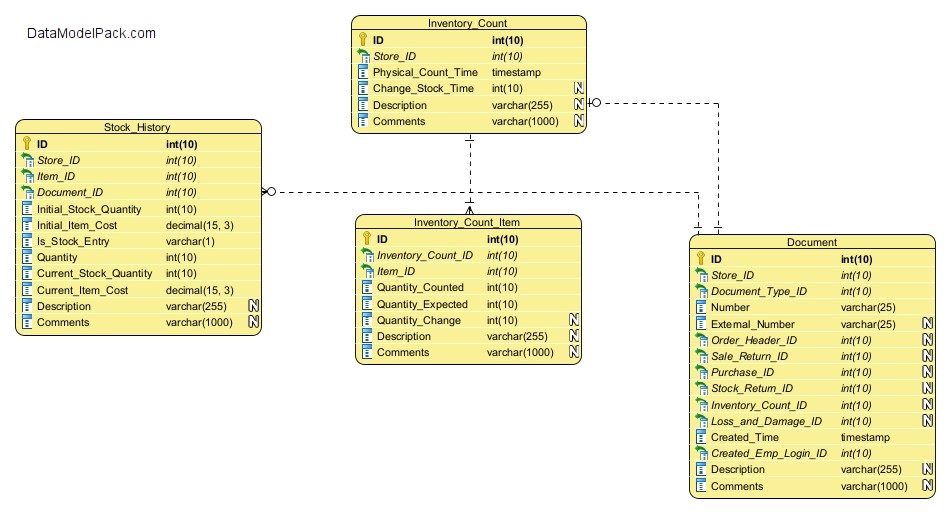
Entity: INVENTORY_COUNT
List of Inventory Counts performed at a Store.
| Attributes | Description |
|---|---|
ID |
PRIMARY KEY |
Store_ID |
Lookup for the Store at which the Inventory Count was performed NOT NULL |
Physical_Count_Time |
Timestamp when the Inventory Count was performed. NOT NULL |
Change_Stock_Time |
Timestamp when the results of the Inventory Count were applied to Stock. |
Description |
Inventory Count description. |
Comments |
Internal notes used for clarifications on record content. |
Entity: INVENTORY_COUNT_ITEM
List of Items counted during an Inventory Count performed at a Store.
| Attributes | Description |
|---|---|
ID |
PRIMARY KEY |
Inventory_Count_ID |
Lookup for the Inventory Count to which the Item count is assigned. NOT NULL |
Item_ID |
Lookup for the Item that was counted. NOT NULL |
Quantity_Counted |
Item quantity counted. NOT NULL . |
Quantity_Expected |
Item quantity expected. INVENTORY_COUNT_ITEM.Quantity_Expected is the same with ITEM.Current_Stock_Quantity.NOT NULL . |
Quantity_Change |
Item quantity to be applied as a change to ITEM.Current_Stock_Quantity. Quantity_Change = Quantity_Counted - Quantity_Expected. NOT NULL |
Description |
Item description. |
Comments |
Internal notes used for clarifications on record content. |
Entity: STOCK_HISTORY
This entity records information about Items stock movements (stock entry or stock exit) at a Store.
| Attributes | Description |
|---|---|
ID |
PRIMARY KEY |
Store_ID |
Lookup for the Store at which the stock movement is recorded. NOT NULL |
Item_ID |
Lookup for the Item for which the stock movement is recorded NOT NULL |
Document_ID |
Lookup for the Document that justifies the stock movement. See Subject Area: DOCUMENT for more information. NOT NULL |
Initial_Stock_Quantity |
Item stock quantity before the Item stock movement. STOCK_HISTORY.Initial_Stock_Quantity is the same with ITEM.Current_Stock_Quantity. NOT NULL |
Initial_Item_Cost |
Item cost before the Item stock movement. STOCK_HISTORY.Initial_Item_Cost is the same with ITEM.Current_Item_Cost. NOT NULL |
Is_Stock_Entry |
Flag attribute to indicate if the stock movement is a stock entry (Item quantity added to stock) or a stock exit (Item quantity decresead from stock). If Is_Stock_Entry is TRUE then the stock movement is a stock entry (Item quantity added to stock), otherwise is a stock exit (Item quantity decresead from stock). NOT NULL |
Quantity |
Quantity to be added to or decreased from stock. |
Current_Stock_Quantity |
Item stock quantity after the Item stock movement: STOCK_HISTORY.Current_Stock_Quantity = STOCK_HISTORY.Initial_Stock_Quantity + STOCK_HISTORY.Quantity
and at the same time the Entity: ITEM must be updated: ITEM. Current_Stock_Quantity = STOCK_HISTORY.Current_Stock_Quantity |
Current_Item_Cost |
Item cost after the Item stock movement. See the Notes below for more information. NOT NULL |
Description |
Stock movement description. |
Comments |
Internal notes used for clarifications on record content. |
Entity: DOCUMENT
This entity records the document that justify an Item stock movement: a stock entry (Item quantity added to stock) or a stock exit (Item quantity decresead from stock).
Documents Example:
⦁ Inventory Count
⦁ Sale Order
⦁ Sale Return
⦁ Purchase
⦁ Stock Return etc
See Subject Area: DOCUMENT for more information.
| Attributes | Description |
|---|---|
ID |
PRIMARY KEY |
Store_ID |
Lookup for the Store at which the document is recorded. NOT NULL |
Document_Type_ID |
Lookup for the Document Type. See Subject Area: DOCUMENT for more information. NOT NULL |
Number |
Document number. NOT NULL |
External_Number |
Document external number (for example when the document is a supplier invoice for a purchase). |
Order_Header_ID |
Lookup for the Sale Order if Document Type is '200 - Sale Order'. See Subject Area: DOCUMENT for more information. |
Sale_Return_ID |
Lookup for the Sale Return if Document Type is '210 - Sale Return'. See Subject Area: DOCUMENT for more information. |
Purchase_ID |
Lookup for the Purchase if Document Type is '100 - Purchase'. See Subject Area: DOCUMENT for more information. |
Stock_Return_ID |
Lookup for the Stock Return if Document Type is '120 - Stock Return'. See Subject Area: DOCUMENT for more information. |
Inventory_Count_ID |
Lookup for the Inventory Count if Document Type is '300 - Inventory Count'. See Entity: INVENTORY_COUNT for more information. |
Loss_and_Damage_ID |
Lookup for the Loss and Damage if Document Type is '400 - Loss and Damage'. See Subject Area: DOCUMENT for more information. |
Created_Time |
Timestamp when Document was created. NOT NULL |
Created_Emp_Login_ID |
Lookup for the Store Employee who created the Document. NOT NULL |
Description |
Stock movement description. |
Comments |
Internal notes used for clarifications on record content. |