Car Service Data Model | Subject area: CUSTOMER
Subject area: CUSTOMER
Overview
Visualize the subject area with clear database diagram:
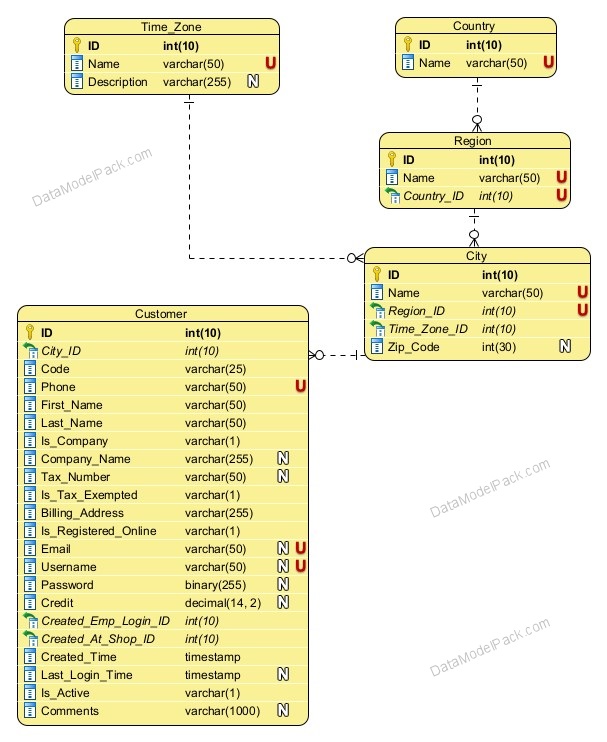
Learn about every entity and attribute:
Customer Registration Process
The Customer Registration Process is a subprocess of the Car Service Order Process and Status.
The Customer of a Car Service shop can be:
- the Owner of a Vehicle registered at the Car Service shop
- the Contact Person for a Vehicle registered at the Car Service shop
The same Customer can be the Owner and/or the Contact Person for one or many Vehicles registered at a Car Service Shop.
Main process steps
Start: A person arrives with a Vehicle at a Car Service Shop
Actions
⦁ The Shop Employee requests information about the Vehicle, the Vehicle Owner and the Contact Person for the Vehicle.
Step 1: Shop Employee searches the database to see if the Vehicle is already registered
Actions
⦁ If the Vehicle is not already registered, then the Shop Employee registers a new Vehicle. See Subject Area: VEHICLE and Car Service Order Process and Status for more information.
⦁ If the Vehicle is already registered, then Next Step: Step 2
Step 2: Shop Employee searches the database to see if the Vehicle Owner is already registered
Actions
⦁ If the Vehicle Owner is not already registered, then the Shop Employee registers a new Customer. Next Step: Step 4
⦁ If the Vehicle Owner is already registered, then Next Step: Step 3
Step 3: Shop Employee searches the database to see if the Vehicle Contact Person is already registered
Actions
⦁ If the Vehicle Contact Person is not already registered, then the Shop Employee registers a new Customer. Next Step: Step 4
⦁ If the Vehicle Contact Person is already registered, then Next Step: Stop - Customer registration complete
Step 4: Shop Employee registers a new Customer in the database
Actions
⦁ Shop Employee records all the mandatory information about Customer:
- Phone
- First_Name
- Last_Name
- Is_Company
- Company Name (if Is_Company TRUE)
- Tax_Number
- Is_Tax_Exempted
- Billing_Address
⦁ Shop Employee can create an online account for the Customer if the Customer agrees. In this case, the following CUSTOMER entity attributes are mandatory:
- Username
- Password (to be changed next time when Customer will access the online account)
Stop: Customer registration complete
Actions
⦁ A new record for Customer is created in the database.
⦁ If an online user account was created for the Customer then the CUSTOMER.Is_Registered_Online flag attribute is set TRUE. See Entity: CUSTOMER, Attribute: Is_Registered_Online for more information.
Important
Only Customers who are REGISTERED ONLINE are allowed to:
⦁ review Orders and provide feedback ONLINE.
See Subject Area: ORDER Entity: ORDER_REVIEW for more information.
Entity: CUSTOMER
| Attributes | |
|---|---|
| ID | PRIMARY KEY |
| City_ID | Lookup for the City where the Customer is located. NOT NULL |
| Code | Shop internal code for Customer. NOT NULL |
| Phone | Customer phone number. UNIQUE identifies the Customer. Cannot register two Customers with the same phone number NOT NULL UNIQUE |
| First_Name | Customer First Name NOT NULL |
| Last_Name | Customer Last Name NOT NULL |
| Is_Company | Flag attribute to indicate if there is an individual or a company Customer. NOT NULL |
| Company_Name | Company Name. If Is_Company is TRUE then Company_Name is mandatory |
| Tax_Number | Customer Tax Number |
| Billing_Address | Customer Billing Address used for creating invoice. NOT NULL. |
| Is_Registered_Online | Flag to indicate if the Customer has an online account. NOT NULL |
| Customer email address. If the Customer is REGISTERED ONLINE then Email is mandatory. UNIQUE identifies the Customer. Cannot register two Customers with the same email | |
| Username | Customer username. If the Customer is REGISTERED ONLINE then Username is mandatory. UNIQUE identifies the Customer. Cannot register two Customers with the same username. |
| Password | Customer password. If the Customer is REGISTERED ONLINE then Password is mandatory. |
| Credit | Total Credit Amount of the Customer. Customer can receive Credit as result of ORDER_REVIEW.Compensation. See Subject Area: ORDER, Entity: ORDER_REVIEW, Attribute: Compensation for more information. |
| Created_Emp_Login_ID | Lookup for the Shop Employee who created the Customer record. NOT NULL |
| Created_At_Shop_ID | Lookup for the Shop where the Customer record was created. NOT NULL |
| Created_Time | Date and Time when the Customer record was created. NOT NULL |
| Last_Login_Time | Date and Time of the Customer last login. |
| Is_Active | Flag attribute to indicate if the Customer account is still operational or it is suspended. NOT NULL |
| Comments | Internal notes used for clarifications on record content. |
Entity: COUNTRY
List of Countries where Car Service Shops are located.
| Attributes | |
|---|---|
| ID | PRIMARY KEY |
| Name | Country name. Cannot have to countries with the same name. NOT NULL UNIQUE |
Entity: REGION
List of Regions where Car Service Shops are located.
| Attributes | |
|---|---|
| ID | PRIMARY KEY |
| Name | Region name NOT NULL |
| Country_ID | Lookup for Country. NOT NULL |
CONSTRAINT UK_Region UNIQUE (Name, Country_ID) Cannot have two regions with the same name in a Country.
Entity: TIME_ZONE
List of Time Zones for Car Service Shops locations.
| Attributes | |
|---|---|
| ID | PRIMARY KEY |
| Name | Time Zone name. Cannot have two Time Zones with the same name. NOT NULL UNIQUE |
| Description | Time Zone Description |
Entity: CITY
List of Cities where Car Service Shops are located.
| Attributes | |
|---|---|
| ID | PRIMARY KEY |
| Name | City name NOT NULL |
| Region_ID | Lookup for Region. NOT NULL |
| Time_Zone_ID | Lookup for Time zone. NOT NULL |
| Zip_Code | City Zip Code |
CONSTRAINT UK_City UNIQUE (Name, Region_ID)) Cannot have two cities with the same name in a Region
Accelerate every database schema design with powerful data models
We have already designed the data model and prepared the SQL scripts for creating the database schema objects.

Product
Resources
Support
© 2026 Data Model Pack · Terms of Use · Privacy